Use case
Keep measuring after the cookie banner
Velo sets the Google Consent Mode v2 default before your tags run and updates it the moment a visitor chooses, so Google, Meta and Microsoft tags all follow the same answer.
Examples on this page use sample data. This is not legal advice.
One visit, step by step
This is what happens for a visitor in an opt in region, from the moment a page starts loading to the next page view.
- Page starts
Velo sets the default
Before your tags run, Velo sets the advertising and analytics signals to denied.
- Tags load
Google tags wait
In advanced mode Google tags load and send cookieless pings. They set no advertising or analytics cookies.
- Visitor chooses
The update goes out
Accept all sends granted to Google, tells the Meta Pixel and Microsoft UET, and pushes velo_consent_update to the data layer.
- Next page
The choice is applied again
On every later page view the stored choice is sent again, so nobody is asked twice.
Tag by tag
A lead generation site runs these tags through Google Tag Manager, with Velo installed from the Velo CMP template. This is what each tag receives from a visitor in Spain.
Illustrative example with sample data, not a customer story.
| Tag | Before a choice | After Accept all | After Reject |
|---|---|---|---|
| Google Analytics 4 | Loads with analytics_storage denied and sends cookieless pings. | analytics_storage granted. | Stays denied. |
| Google Ads | Loads with ad_storage and ad_user_data denied. | The three advertising signals granted. | Stays denied. |
| Meta Pixel | Told that consent is revoked. | Told that consent is granted. | Stays revoked. |
| Microsoft UET | ad_storage denied. | ad_storage granted. | Stays denied. |
| Other pixels | No signal from Velo. | Run, if you marked or gated them. | Stay off, if you marked or gated them. |
After a refusal, Google may model the gap in eligible accounts. Velo sends the signals and does not promise a recovery figure.
A banner should not break your reports
When a consent banner goes live, reported conversions often drop. Part of that is visitors saying no, which is their right. The rest is wiring: a default that arrives late, tags that fire before it, or tags blocked so completely that Google has nothing to model from.
What goes wrong
- The consent default is set after Google tags have already started.
- Meta and Microsoft tags never hear the visitor’s answer.
- Nobody checks what the tags do after a refusal.
What Velo does
- Sets the Consent Mode v2 default before your tags run, denied in opt in regions.
- Sends the update the moment a visitor chooses, and repeats it on later page views.
- Passes the choice to the Meta Pixel, Microsoft UET and Microsoft Clarity when they are on the page.
- Shows accepted, rejected and customised decisions by day and by country.
Where it lives in Velo
This covers the install order, the scanner’s Consent Mode check and the analytics screen.
Get for freeInstall in the right order
Add the Velo CMP template in Google Tag Manager on the Consent Initialization trigger, or paste the snippet above your other tags. That order is what makes the default arrive first.
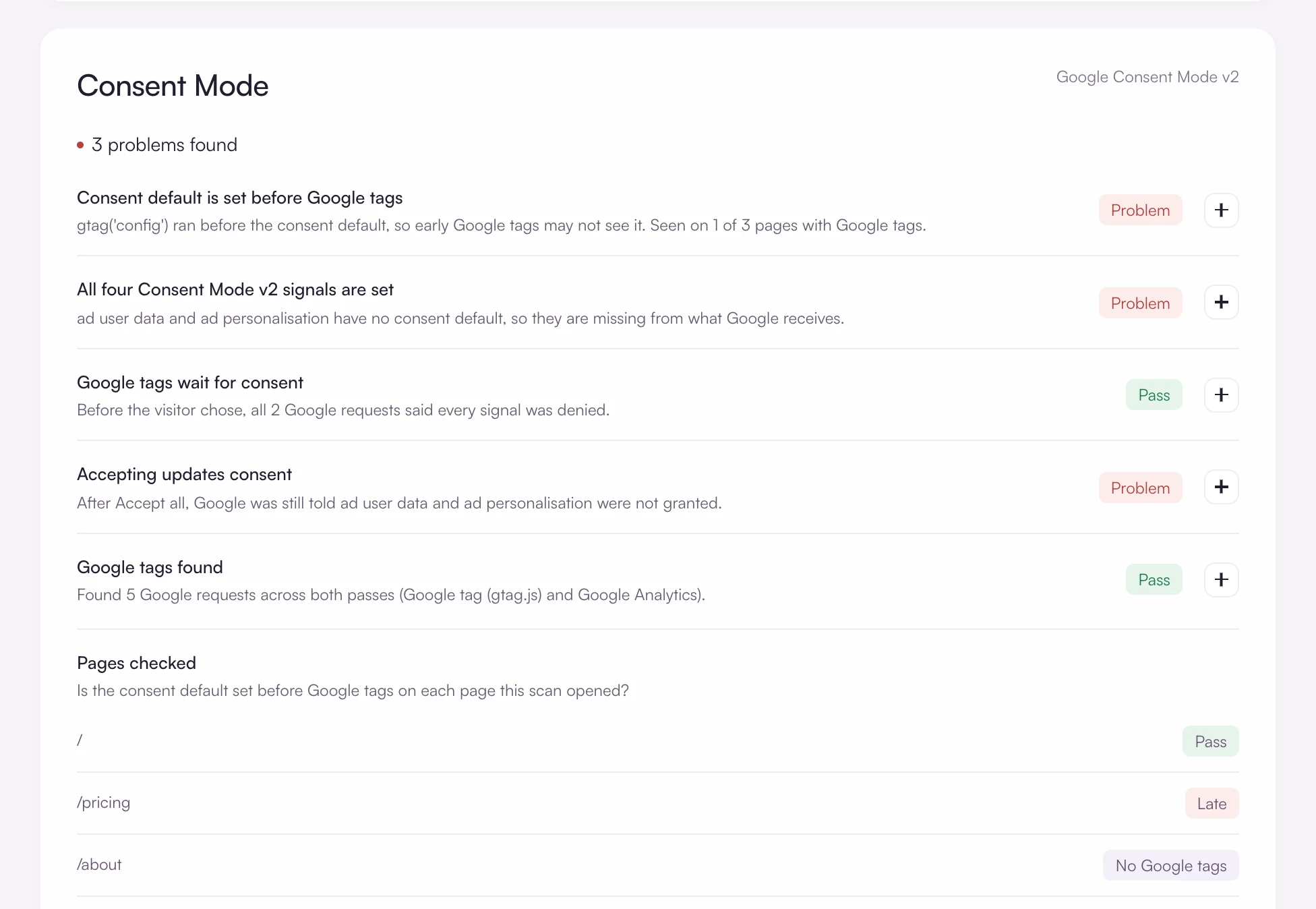
Let the scanner check Consent Mode
Each scan tests whether the consent default is set before Google tags, whether all four signals are set and whether accepting updates them, page by page. Open any page with ?velo_debug=1 in the address to watch the same thing live.
Watch how visitors answer
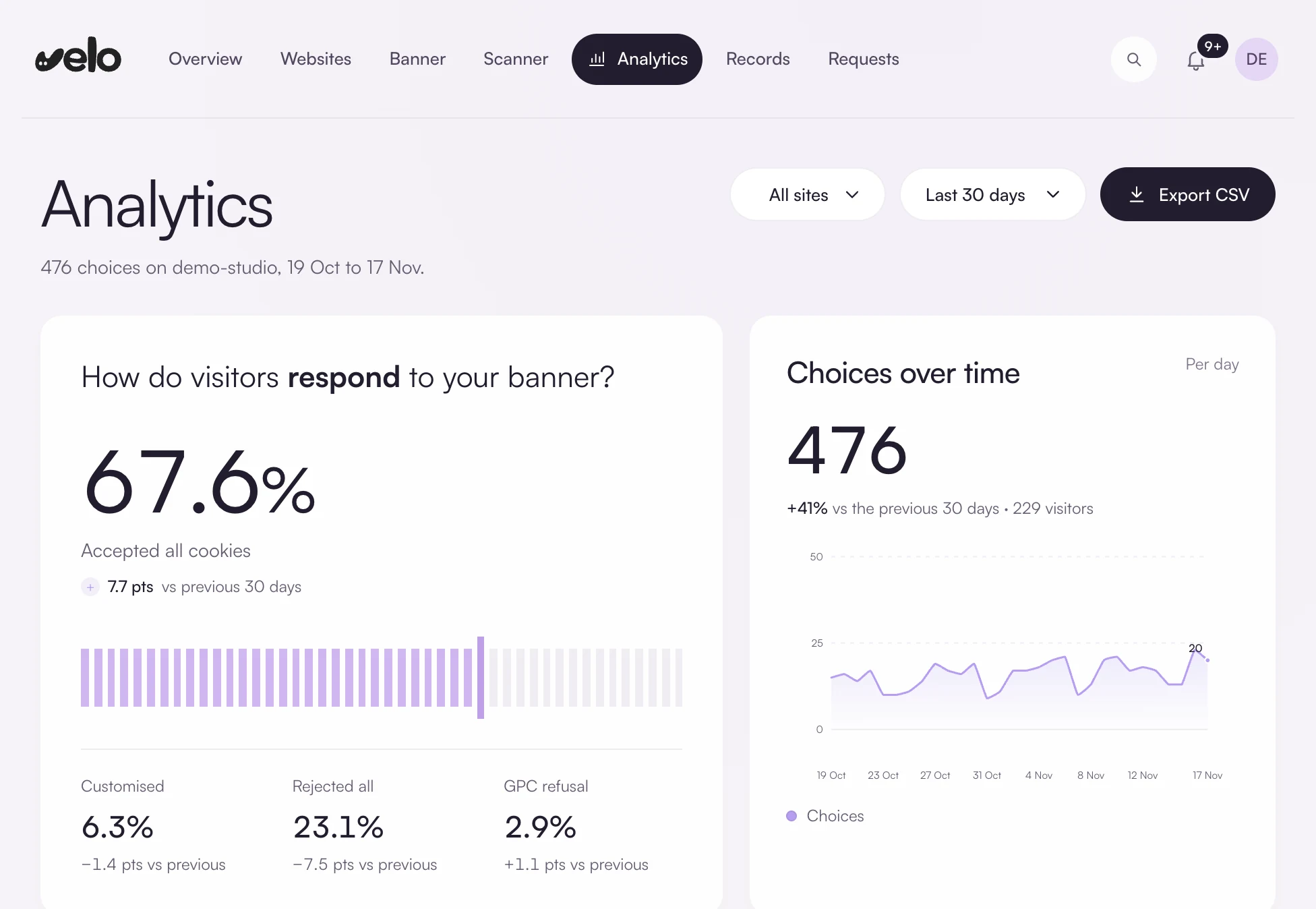
Analytics shows accepted, rejected, customised and Global Privacy Control decisions over 7, 30 or 90 days, by day and by country, with a CSV export.
What Velo covers, and what it does not
The limits, stated plainly, so you can decide before you install anything.
Questions and answers
Will Velo recover my lost conversions?
Velo cannot promise that. It sends accurate consent signals at the right moment, which is what Google’s modelling needs. Whether your account is eligible, and how much is modelled, depends on your traffic and your Google setup.
Do I need Google Tag Manager?
No. The one line snippet sets the same default and sends the same updates. Tag Manager is the better route when your tags already live there, because the Velo CMP template fires on Consent Initialization, before every other tag.
What about the Meta Conversions API?
Velo passes the choice to the Meta Pixel in the browser. It has no direct connection to the Conversions API or the Signals Gateway, so apply the same consent rule to your server events yourself.
Free for one site
Banner, scan and consent records for one site, free. Pro from €7 a month, plus VAT, for unlimited sites.